Business Intelligence
Alternatives to Tableau: 12 Best Tools to Consider in 2026

As businesses face evolving data challenges, finding the right alternatives to Tableau is becoming a strategic priority. With 68% of Chief Data Officers prioritizing improved analytics and 71% struggling to upskill their teams, the demand for tools that offer flexibility, cost-effectiveness, and scalability has never been stronger.
While Tableau remains one of the most recognised names in data visualization, its high costs, limited flexibility, and steep learning curve often make it less than ideal for every organization. Many teams are now seeking Tableau alternatives that provide tailored features, more intuitive interfaces, and seamless integration with their existing systems.
This guide uncovers why exploring alternatives to Tableau might be the game-changing move your business needs. From bridging skill gaps to boosting functionality and optimizing ROI, we'll walk through 12 modern analytics tools and help you identify the right fit for your goals.
For organizations aiming to stay ahead in a data-driven world, considering alternatives isn't just an option, it's a pathway to unlocking greater business success.
Why Consider an Alternative to Tableau?
Tableau has been a dominant force in BI since 2003 and offers a rich feature set for data visualization. But it's not well-suited for every use case. Common pain points that drive teams toward Tableau alternatives include:
- High licensing costs that stretch budgets, especially for smaller teams
- A steep learning curve that creates dependency on technical analysts
- Limited support for complex ETL processes, advanced statistical modeling, or extremely large datasets
- Lack of conversational or AI-native capabilities that modern data workflows demand
For organizations aiming to stay ahead in a data-driven world, exploring programs like Tableau, or tools that go beyond what Tableau offers, isn't just an option. It's a pathway to unlocking greater business success.
How to Choose the Right Tableau Alternative
Choosing the right data analytics tool can transform chaos into clarity, empowering you to confidently make informed decisions. The right alternative to Tableau should integrate seamlessly with your existing tools, provide insights in plain language, and support your entire team, not just technical users.
Here's what to look for:
1. Intuitive, User-Friendly Interface
Select a platform that minimizes complexity and maximizes efficiency. The ideal Tableau alternative bridges the gap between data and decision-making, enabling users to generate insights without extensive training, SQL skills, or analyst support.
2. AI-Driven Insights and Conversational Analytics
Modern platforms leverage AI to simplify analytics. Look for conversational capabilities, natural language queries, generative AI tools, real-time summaries, and predictive analytics, features that deliver actionable insights faster than traditional BI tools.
3. Collaboration and Integration
Choose a solution that enhances teamwork and fits into your current tech stack. The best programs like Tableau integrate with data warehouses, ERP systems, Slack, and Teams, ensuring alignment across your entire organization.
4. Robust Data Security
Prioritize platforms that adhere to rigorous data security standards such as SOC 2 certification, role-based access controls, and enterprise-grade user permissions. Security should never be an afterthought when evaluating Tableau competitors.
5. Streamlined Onboarding and Support
A strong Tableau alternative offers a quick setup and dependable support. Look for platforms with pre-built models, personalized onboarding, and accessible technical resources so your team can generate insights, and ROI, without unnecessary delays.
12 Best Alternatives to Tableau in 2026
Here is our curated list of top Tableau alternatives:
- Lumi AI
- Power BI
- Looker
- AWS QuickSight
- Sigma Computing
- Zenlytic
- ThoughtSpot
- Omni Analytics
- Pyramid Analytics
- Domo
- MicroStrategy
- Metabase
1. Lumi AI
Lumi AI is a powerful alternative to Tableau that delivers complex data insights through its AI-powered enterprise analytics platform. Rather than replacing your existing BI tools, Lumi AI augments them, making data-driven decision-making more accessible across the entire organization.
While platforms like Tableau, Power BI, and Looker excel at data visualization, they often leave teams dependent on manual reports and analyst support for everyday questions. Lumi AI fills that gap by connecting directly to your existing data systems and adding a conversational intelligence layer on top. With features like conversational analytics, integrated business context, and collaborative agents, it allows users to get the answers they need without technical expertise in SQL, Python, or analyst support.
Lumi AI Capabilities
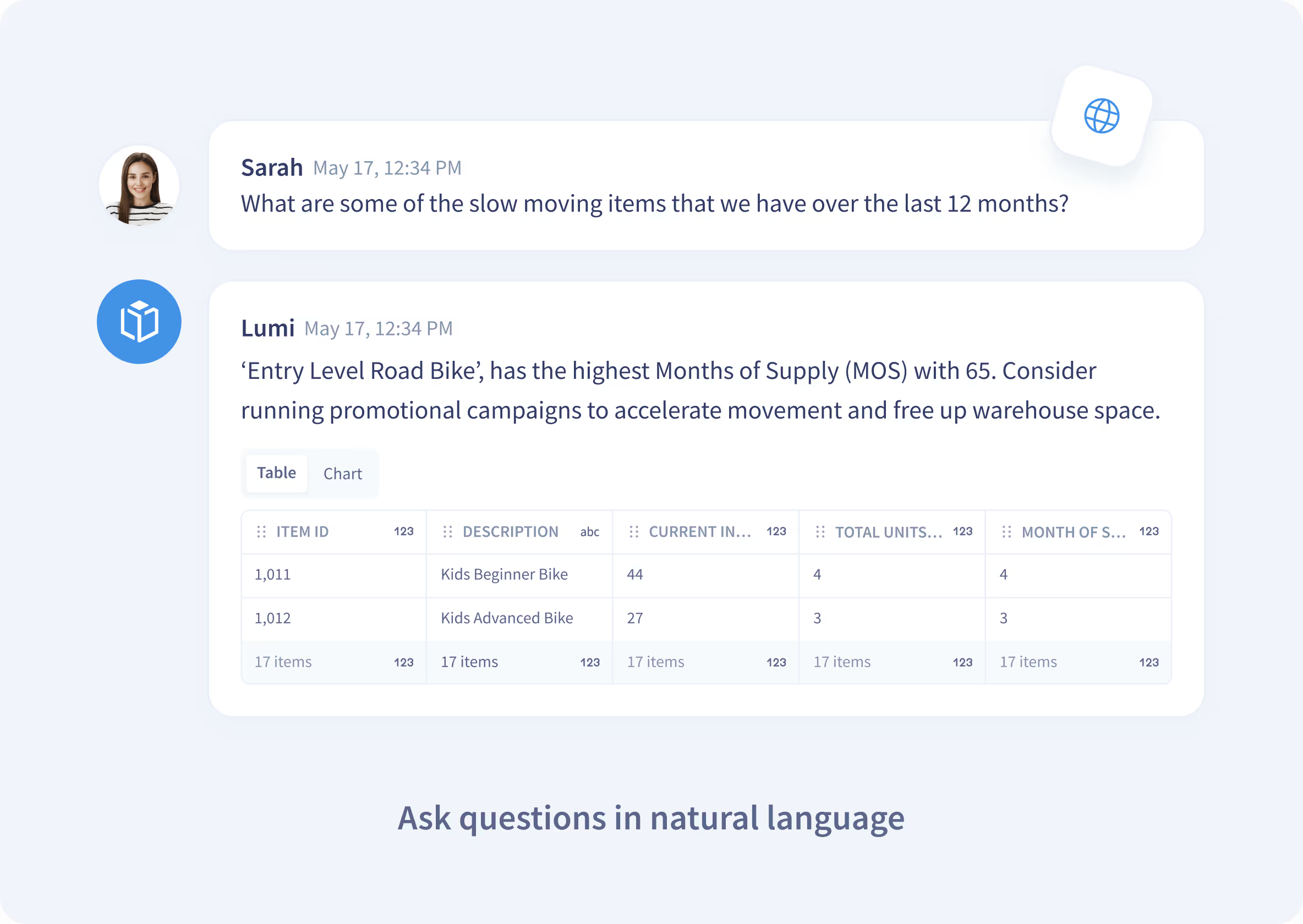
1. Conversational Analytics
Lumi AI changes how users interact with data by enabling natural language queries to access accurate, real-time analytics. This capability eliminates manual SQL scripting or technical intervention, allowing users to extract insights from their datasets seamlessly.
Benefits:
- Accelerates data query and analysis processes
- Reduces ad-hoc reports for overburdened data teams
- Empowers non-technical users to independently explore data
2. Enhanced Business Context
Lumi AI leverages a configurable knowledge base to adapt to your organization's unique data structures, business metrics, and terminology. This allows users to define specific operational terms, KPIs, and calculation methods, ensuring that Lumi understands and responds using your internal business lingo.
The result is tailored, context-rich insights that align with your organization's strategic goals.
Capabilities:
- Knowledge Base Configuration: Admins can define semantic layers, table mappings, and business-specific terminology, enabling Lumi to deliver precise results that reflect internal processes.
- Internal Business Aliases, Details, and KPIs: Lumi can provide context to incorporate your unique operational vocabulary.
By integrating seamlessly with your organization's data and terminology, Lumi AI ensures that insights are accurate but also relevant and actionable for your team.
3. Multi-Agent Collaboration
Lumi AI leverages a network of specialized AI agents through agentic workflows, each designed to address distinct tasks in the data analysis process. These agents collaborate dynamically, using recursive workflows to refine outputs and ensure accurate, contextually relevant insights.
Agent Capabilities:
- Prompt Optimization: Agents work to refine user queries, ensuring clarity and alignment with the organization's data structures.
- Context Awareness: By accessing the knowledge base, agents incorporate business-specific terminology, schema definitions, and KPIs, tailoring insights to the organization's unique environment.
- Code Generation: Specialized agents translate natural language queries into SQL or other executable code formats, delivering precise results from connected data sources.
- Error Resolution: When issues arise, such as ambiguous inputs or execution errors, agents provide detailed feedback and corrective suggestions to guide users toward successful outcomes.
Recursive Workflows:
Lumi AI employs recursive agent workflows to enhance the accuracy and reliability of insights. In this process, agents iteratively refine outputs by identifying and addressing gaps or ambiguities in the initial query or response.
Feedback loops between agents ensure errors are resolved, and results are optimized before being presented to the user. The system adapts dynamically, enabling agents to reprocess data or refine prompts as needed for complex, multi-step queries.
4. Direct Data Integration
Lumi AI integrates seamlessly with existing data architectures, databases, and warehouses, eliminating the need for data duplication or migration. Instead, Lumi generates and executes SQL queries directly within the client's data environment, ensuring security, accuracy, and real-time performance.
Key Features:
- No Data Duplication: Lumi operates on your existing data infrastructure, connecting directly to databases, data warehouses (e.g., Snowflake, BigQuery, Amazon Redshift, SAP, and Databricks), or on-premises systems. This approach preserves data integrity and minimizes storage redundancy.
- Client System Execution: All SQL queries are executed within the client's data environment, leveraging existing configurations and ensuring that data remains securely within the organization's network.
- Real-Time Updates: Lumi accesses live data, enabling users to generate insights based on the most up-to-date information available in their operational systems.
Benefits:
- Maintains full control and security over data by eliminating the need for off-platform processing or duplication.
- Reduces latency in insights delivery by executing queries directly in the source architecture.
- Supports scalability by integrating seamlessly with cloud and on-premises systems without requiring additional infrastructure.
By connecting directly to client data environments, Lumi AI streamlines analytics workflows, allowing organizations to extract actionable insights while maintaining complete control over their data.
5. Built for Collaboration
Lumi allows teams to share insights seamlessly and maintain alignment across departments. The platform allows users to share chat-based interactions, ensuring that key findings and insights are accessible to relevant stakeholders in real-time.
Lumi's personal and/or publishable boards also provide a centralized space for users and teams to organize, revisit, and refine their most important queries and reports.
Collaboration Features:
- Chat Sharing: Users can share interactive chat sessions with colleagues, preserving the context and logic behind the data queries. This ensures that teams are always on the same page when interpreting insights.
- Boards: Create custom boards to pin frequently used prompts, insights, and visualizations. These boards can be refreshed automatically to reflect the latest data, making it easy to monitor key metrics over time.
Lumi AI's collaboration tools ensure that teams stay aligned and informed, whether sharing findings in real-time or working independently to track and analyze their metrics. It enhances teamwork by providing shared access to insights and analysis, while reducing duplication of effort in creating reports or re-explaining data logic.
6. Enterprise-Grade Security
Lumi AI ensures enterprise-grade security by keeping all data within the client's architecture. Queries are executed directly on the client's databases or data warehouses, eliminating the need for data duplication. Only the results of the queries are returned.
Key Features:
- Role-Based Access: Admins, contributors, and viewers are assigned permissions to control access and actions securely.
- Multiple Knowledge Bases: Create separate knowledge bases for different teams or data sets, ensuring appropriate segmentation and secure collaboration.
Lumi AI's secure architecture allows organizations to analyze data confidently, maintaining full control and compliance while enabling efficient, tailored workflows.
Pricing: Standard plan from $50/user/month; Pro plan from $75/user/month. See lumi-ai.com/pricing for details.
Support: 24/7 via email, chat, and phone. Managed knowledge base and data consulting available.
2. Power BI

Power BI, developed by Microsoft, is one of the most widely adopted Tableau alternatives, offering robust data visualization capabilities and tight integration with the Microsoft ecosystem, Excel, Azure, Teams, and more. It is more affordable and easier to set up for companies already using Microsoft products.
Pros:
- Wide range of customizable charts and graphs
- Built-in machine learning for advanced analytics
- Works seamlessly with Microsoft products
- Cost-effective entry price
Cons:
- Steep learning curve for beginners
- Complex customizations require coding skills
- Desktop version unavailable for Mac
Pricing:
- Free: $0, Create reports with Power BI Desktop
- Pro: $10/user/month, Free + Publish reports
- Premium: $20/user/month, Pro + dataflows, datamarts, 100GB memory
- Embedded: Variable
Support: Self-help resources, community forums, and direct support channels.
3. Looker

Looker, as part of Google Cloud, is a strong Tableau alternative for organizations already invested in the Google ecosystem. It's valued for governed data analysis, real-time interactive dashboards, and extensive API coverage.
Pros:
- Robust APIs for embedding dashboards and data apps
- AI capabilities through Vertex AI
- Cloud-based with no local installation required
Cons:
- Complex for users unfamiliar with database tools
- Less transparent pricing; requires consultation
- Requires internet connection
Pricing: Platform + user-based pricing tiers (Standard, Enterprise, Embed). Contact Looker for specifics.
Support: In-app chat, email, and Google Cloud Console.
4. AWS QuickSight

AWS QuickSight is a serverless, cloud-based business intelligence service powered by machine learning. It's a natural Tableau alternative for teams already running workloads on AWS, offering anomaly detection, forecasting, natural language narratives, and contribution analysis.
Pros:
- Native integration with AWS services and third-party applications
- Auto-scaling with usage-based pricing; no infrastructure management required
- Near real-time insights via SPICE engine
Cons:
- Missing some visualization types (e.g., Gantt charts, candlestick graphs)
- Complex for beginners on advanced features
- Hourly refresh limits on some editions
Pricing:
- Reader: $3/user/month
- Author: $24/user/month
- Author Pro: $50/user/month
Support: Paid AWS Support plans, online documentation, community forums, and the AWS console.
5. Sigma Computing

Sigma Computing is a cloud-native BI platform that gives users live access to cloud data warehouses through a familiar spreadsheet-like interface. It's a good option for teams who want Tableau-like power without traditional BI complexity, supporting billions of rows of data without compromising speed or security.
Pros:
- User-friendly for non-technical users
- Powerful real-time data analysis at scale
- Seamless cloud data warehouse integration
Cons:
- Limited advanced customization for power users
- Potential performance issues with very large datasets
- Higher pricing compared to some competitors
Pricing: 14-day free trial. Annual enterprise pricing from ~$15,900 (200 users) to ~$81,400+ (1,000+ users).
Support: Live chat via Help menu, email, and phone.
6. Zenlytic

Zenlytic is a business intelligence platform combining dashboards, self-serve exploration, and an AI data analyst (Zoë). It's designed to deliver the experience of talking to an analyst, making it one of the more approachable Tableau alternatives for non-technical teams.
Pros:
- Self-service BI for non-technical users
- Consolidates data from multiple sources seamlessly
- Consistent metrics via advanced semantic layer
Cons:
- Dashboard customization not highly intuitive
- AI emphasis may overlook basic BI features
- Smaller user base means fewer third-party integrations
Pricing: Free trial available. Pricing varies based on data volume, users, and features.
Support: Via Help menu in-app.
7. Thoughtspot

ThoughtSpot is an AI-powered analytics platform offering self-service data exploration through its AI analyst, Spotter. It's a notable Tableau competitor for enterprises that need fast, natural-language-driven analysis across large datasets.
Read more: Lumi AI vs. ThoughtSpot
Pros:
- Fast performance for analyzing large datasets
- Intuitive AI-powered interface for non-technical users
- Powerful data exploration with interactive, drillable visualizations
Cons:
- Complex data modeling and integration requirements
- Requires significant data preparation for optimal performance
- High and unpredictable pricing for smaller teams
Pricing: Team tier starts at $1,250/month (Essentials, 20 users).
Support: 24/7 worldwide via phone, email, or community forums.
8. Omni Analytics

Omni Analytics is a comprehensive BI platform that blends the flexibility of workbooks with enterprise-grade governance. It caters to both technical and non-technical users through point-and-click exploration, spreadsheet-style formulas, and SQL capabilities.
Pros:
- Intuitive interface for technical and non-technical users
- Flexible data exploration with connected workbooks and SQL
- Combines governance with self-service analytics
Cons:
- Lacks some advanced functionality
- Limited dashboard customization
- Quote-based pricing may concern smaller teams
Pricing: 7-day free trial; quote-based pricing.
Support: Slack channel, email.
9. Pyramid Analytics

Pyramid Analytics offers a decision intelligence platform combining business analytics with AI-driven insights. It provides a unified, no-code interface for data exploration, visualization, and advanced analytics, including geospatial analysis and enterprise-wide reporting.
Pros:
- Scalable for large data environments
- Integrates with diverse data sources and tools
- Strong data manipulation and transformation capabilities
Cons:
- Overwhelming for simpler analytics needs
- Limited customization for certain visualizations
- UI can feel dated
Pricing: Free trial available. Enterprise pricing starts around $10,000–$20,000/year.
Support: Customer Support Portal.
10. Domo

Domo is a cloud-native BI platform for fast, scalable, and comprehensive data analytics. It enables users to connect diverse data sources, transform data into actionable insights, and create interactive dashboards with sub-second query times. Domo also features built-in ETL capabilities and tools to turn visualizations into business-wide applications.
Pros:
- Rapid insights with on-the-fly BI processing
- Cloud-native architecture for massive data scalability
- Comprehensive data integration and ETL capabilities
Cons:
- Limited data modeling compared to some Tableau competitors
- Performance issues with complex large datasets
- Steep learning curve with inadequate documentation
Pricing: Credit-based, usage-driven model.
Support: 24/7 via Customer Portal.
11. Microstrategy

MicroStrategy ONE is a comprehensive enterprise BI platform with AI integration, designed to make complex data analysis accessible through natural language queries, HyperIntelligence, and convenient visualizations. HyperIntelligence seamlessly delivers actionable data into users' daily routines without requiring access to back-end systems.
Pros:
- Robust enterprise-grade features with high scalability
- Advanced AI and machine learning integration
- HyperIntelligence for contextual data delivery in everyday applications
Cons:
- Steep learning curve for users without prior BI experience
- Higher costs compared to some competitors
- Complex setup and configuration
Pricing: Contact the MicroStrategy sales team.
Support: 24/7 via Support Portal, phone, email, and community forums.
12. Metabase

Metabase is a user-friendly BI platform that lets companies explore and visualize data quickly, without extensive SQL knowledge. Supporting 20+ data sources, it can be deployed as a free open-source instance or through hosted plans, making it one of the most accessible programs like Tableau for smaller teams.
Pros:
- Intuitive interface for non-technical users
- Quick setup and deployment options
- Flexible pricing from free open-source to enterprise
Cons:
- Lacks some advanced enterprise features
- Potential performance issues at scale
- Limited customization versus dedicated Tableau competitors
Pricing:
- Starter: $85/month
- Pro: $500/month
Support: Help menu, email, community forums, and dedicated support channels.
Summary: Choosing the Best Tableau Alternative for Your Organization
Tableau is a big name in data analytics, but it's not a perfect match for every team. The best Tableau alternatives 2026 has to offer span a wide spectrum, from Microsoft's Power BI for teams embedded in the Microsoft ecosystem, to AI-native platforms like Lumi AI that bring conversational intelligence to enterprise data workflows.
When evaluating any Tableau alternative, assess your organization's specific needs: technical sophistication of your team, data volume, integration requirements, security standards, and budget. The right tool will elevate your data-driven decision-making and grow with your business.
Lumi AI stands out among Tableau competitors for its ability to significantly outperform traditional BI tools in handling complex queries, integrating business context, and making insights accessible to everyone, without replacing the BI stack you've already invested in. Customers like Chalhoub have used Lumi to identify $60M in growth opportunities by surfacing insights that traditional dashboards missed.
Pricing: Standard plan from $50/user/month; Pro plan from $75/user/month. Visit our pricing page for more information.
Support: 24/7 support via email, chat, and phone. Managed knowledge base services and data consulting available.
Schedule Your Free Demo Today and discover how AI-powered insights can give you a competitive edge.
FAQs: Alternatives to Tableau
Why is Tableau so popular?
Tableau has been widely used in the industry since it was founded in 2003 and has built many powerful features for data visualization, making it a default choice for enterprise data teams.
What is Tableau not good for?
Tableau is not well-suited for complex data creation, modeling, or ETL processes, advanced statistical analysis, handling extremely large datasets, or providing cost-effective solutions for small businesses. This is why many teams look for an alternative to Tableau.
Which industry uses Tableau the most?
The Information Technology and Services industry is the largest segment of Tableau users, accounting for 13% of its customer base.
Can Excel replace Tableau?
Excel cannot fully replace Tableau due to Tableau's superior capabilities in data visualization, handling large datasets, real-time analytics, and creating interactive dashboards, all of which are beyond Excel's core functionality as a spreadsheet tool.
What is the best free Tableau alternative?
Metabase offers a free open-source deployment, making it one of the most accessible free Tableau alternatives. Power BI also offers a free tier for creating reports with Power BI Desktop.

Anthony Scalzitti is a Value Engineer at Lumi AI, specializing in implementations and customer success. With a background in computer science and experience in AI strategy and analytics, he ensures Lumi’s solutions deliver real impact for customers.
.avif)

The New Standard for Analytics is Agentic
Make Better, Faster Decisions.